Playing Obby: Keyboard Run +1 Speed on Prinxy
The story about Obby: Keyboard Run +1 Speed
Obby: Keyboard Run +1 Speed: A 3D Obby Game Where You Sprint Across Giant Keyboard Keys and Get Faster With Every Step
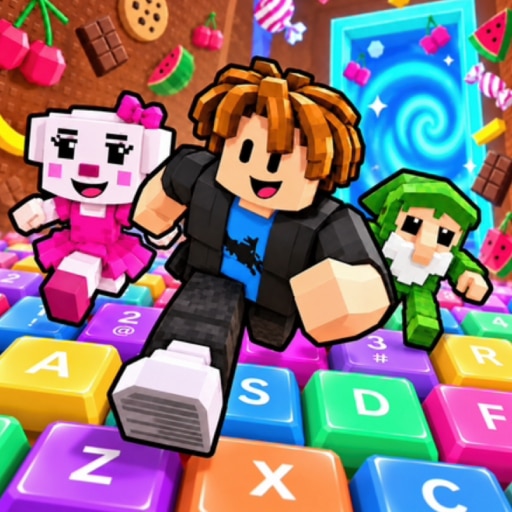
Obby: Keyboard Run +1 Speed is a 3D obby game where you run and jump across oversized keyboard keys, building up speed with every step as you race toward the trophy. Each course is an obstacle run, each win earns you upgrades, and each upgrade makes the next course a little easier to chase. If you've ever wished your desk were a playground, this game turns it into one.
What Is an Obby?
"Obby" is short for obstacle course. The word became popular through Roblox-style games, where players race across platforms, gaps, and hazards to reach the end. The appeal is simple: the goal is clear, failure is quick, and trying again costs you nothing. That's why obbies suit short sessions and long ones equally well.
Run Across a Giant Keyboard
The twist here is the setting. You can run and jump across oversized keyboard keys, which makes every platform feel like something you recognize and a little absurd at the same time. Hopping from key to key has an odd satisfaction to it, like finally getting back at all those hours spent typing. I laughed the first time I missed a jump and slipped between the keys, but the instant restart made it easy to go straight back in.
Speed Builds With Every Step
The +1 Speed idea is the heart of the game. You can build up speed as you go, so you move faster the longer you keep running. Fast movement makes jumps feel more exciting, but it also makes them harder to time. That balance between going quicker and staying in control is what keeps each course interesting.
Tackle the Obstacle Courses
Each course asks you to read the layout, time your jumps, and get past the obstacles in your way. You can take your time, since there's no pressure to rush. Reaching the trophy at the end is the goal, and the feeling of landing the final jump never really gets old.
Collect Wins and Unlock Upgrades
Reaching the trophy earns you wins, and wins fuel your progress. You can collect wins and unlock character upgrades, then use those upgrades to progress further. This loop gives every attempt a purpose: even a hard course feels worthwhile because it moves you closer to the next upgrade.
Explore Both Worlds
The game offers two worlds to explore, and you can move through them at your own pace. Optional ad rewards are available if you want extra bonuses, and you can skip them without losing anything. Your progress saves, so you can leave and return to the same point.
Simple Controls on Any Device
On a computer, you move with WASD, jump with Space, and hold the right mouse button to look around. On mobile, you use the joystick to move, drag the screen to look, and tap Jump. There's no complicated setup, so you can start running right away.
Why You'll Love It
- Run and jump across giant keyboard keys in a quirky 3D obby
- Build speed with every step for faster, more exciting runs
- Reach the trophy to collect wins and unlock character upgrades
- Explore two worlds at your own pace
- Enjoy saved progress and optional ad rewards
Play more online games like Obby Online With Friends: Draw And Jump
If you like this game, you might also be interested in other online Roblox Style Games. Here are other popular games you should try next:
- Obby Online With Friends: Draw And Jump
- Dress To Impress
- Runway Star 3D - Pick The Look
- Fashion Princess - Dress Up For Girls
- Supermarket Simulator: Store Cashier
- Dress To Impress: Random Clothes
- Minimarket 67/7: Store Tycoon
FAQ
1. How do you play Obby: Keyboard Run +1 Speed?
You run and jump across keyboard-key platforms to reach the trophy at the end of each course. On a computer you use WASD to move, Space to jump, and the right mouse button to look around. On mobile you use a joystick, drag to look, and tap Jump.
2. What are wins used for?
You earn wins by reaching the trophy at the end of a course. Wins let you unlock character upgrades, which help you progress further.
3. Does the game save your progress?
Yes. Your progress is saved, so you can return to your upgrades and wins later.
4. Do you have to watch ads to play?
No. Ad rewards are optional and only offer extra bonuses if you choose to use them.
5. Is Obby: Keyboard Run +1 Speed free to play online?
Yes, it's free to play in your browser at prinxy.app, with no downloads or installs required.